$9/month
10 managed collections- 2 Shareable Lists
- Sort up to 1,000 products per collection
- 1 daily sync slot
Collection merchandising for Shopify
Build collections from what’s selling. Give profit contributors a better position. Turn the weekend into a different edit.
Ask about early access ↗One collection. More commercial possibilities.



Illustrated recipes using our ceramics collection.
01 / Advanced Sort
Revenue, gross profit, recent momentum, or a deliberate mix of product groups. Give the first row a commercial job.
In this example, a high-revenue vase makes less gross profit than the tea cups. Switch to seven-day gross profit and Colin puts the cups first.
Profit needs accurate costs and synchronized sales. Segment and Strategy require Part-time or Full-time.
Illustrated example
Same products. A different commercial priority: rank by gross profit over the last seven days.
Illustration using real product photos and example sales, costs, and stock. Your results use synchronized store data.
Sort by Sales growth (7d), descending, to put recent momentum ahead of lifetime popularity. Use synchronized sales data and keep inventory safeguards enabled.
With Segment, select four recently published products for the first group, then eight leaders by Revenue (7d). Place the remaining products afterward. Set claiming priority so overlapping products appear once. Segment requires Part-time or Full-time.
Use Segment to put products with Size availability of at least 75% first, ordered by Revenue (30d). Follow with the remaining products. This uses distinct Size-option availability and requires a Part-time or Full-time plan.
Use Strategy to group by product type, sort each group by Revenue (30d), and take round-robin batches from those groups. Configure Strategy on the collection or through ChatGPT. Requires Part-time or Full-time.
Use Segment to select products with inventory above 50 and fewer than five units sold in seven days. Give that group a deliberate position and order the rest by recent revenue. Requires Part-time or Full-time.
Sort by Revenue (7d), then shuffle only the top eight products. The strongest recent performers retain the leading positions while their order changes when the sort runs.
Use the Rotate action to cycle the leading four products when the collection syncs. Keep this as a rotation setup; it is separate from a multi-step Strategy.
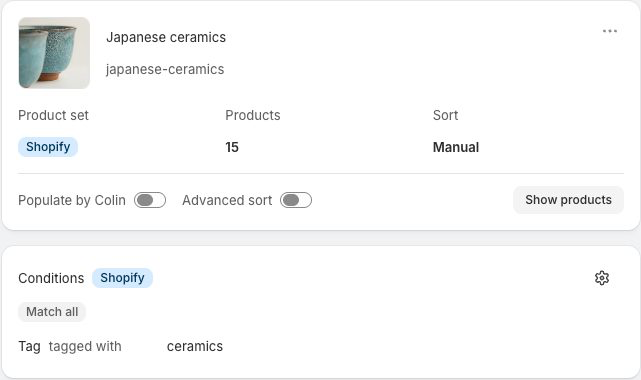
02 / Populate by Colin
“At least ten sales this week, with stock to keep going.” That is a collection Colin can maintain as demand changes.
Combine recent sales, growth, gross profit, stock, and dates. Use grouped conditions and a top-N limit for a tightly selected edit.
Colin refreshes its own product block during sync. Other Shopify product sets can contribute alongside it.
Illustrated example
Units sold (7d) ≥ 10 AND inventory ≥ 20. Membership follows recent demand and available stock.
Illustration using real product photos and example sales, costs, and stock. Your results use synchronized store data.
Require active, in-stock products. Select the top 20 by Revenue (30d). Colin refreshes the membership at sync, so the collection follows the current sales window.
Combine positive Sales growth (7d), at least ten Units sold (7d), and inventory of 20 or more. Limit the result to 12, ordered by growth.
Combine a recent Restocked date, in-stock status, and at least five Units sold (7d). Keep a focused selection ordered by recent revenue; restock history must be available in Colin.
Require Discounted = No and in-stock status, then select the top 24 by Gross profit (30d). Keep product costs current so the profit data is meaningful.
Require inventory of at least 50 and fewer than five Units sold (7d). This makes a working collection for a clearance edit without adding sale prices or discounts.
Combine a recent Published date with at least three Units sold (7d). Use a top-12 limit ordered by recent revenue to build a collection of new products with demonstrated demand.
Use grouped conditions: in stock AND either at least 20 Units sold (30d), OR a recent Published date with at least three Units sold (7d). One Colin product block can follow both paths.
03 / Campaigns and Schedules
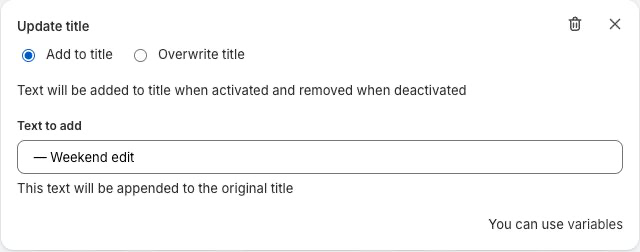
Keep everyday markdowns outside your regular edit. When the weekend window opens, include them, send them to the top, and give the collection its sale title.
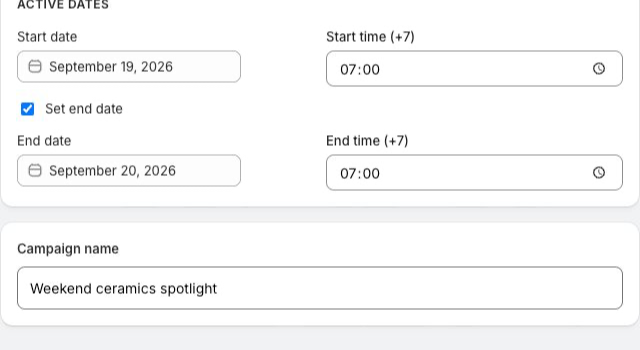
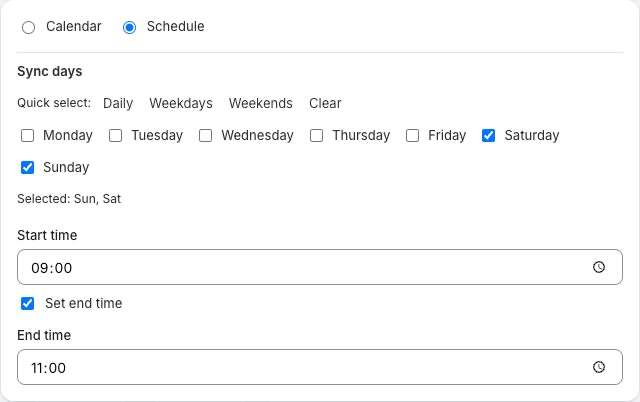
Use a Calendar Campaign for specific dates, or a Schedule for Saturday and Sunday windows. Here, each day runs from 09:00 to 23:00.
This recipe targets the Colin product block. “Discounted” identifies products with a compare-at markdown. Colin does not set sale prices.
Illustrated example
Saturday & Sunday, 09:00–23:00: change the selection, promote existing markdowns, and rename the collection.
Illustrated recurring Schedule on a Colin product block. Markdown prices already exist in Shopify; Colin changes merchandising, not prices. Other product sets remain independent.
Use a Monday–Friday Schedule from 11:00 to 14:00. Temporarily change the Colin product block to in-stock products priced below $30 with recent sales, sort by Revenue (7d), and append “— Lunch break” to the title.
Use a bounded Calendar Campaign for the launch evening. Temporarily broaden the Colin conditions to include the launch products, prioritize new arrivals, and add a launch suffix to the title.
Choose specific payday dates in a Calendar Campaign. Temporarily select in-stock products above your chosen price threshold and rank them by Gross profit (30d). Restore the supported Campaign-owned settings at the end.
During your chosen shipping-cutoff dates, feature products you have tagged as ready to ship, require stock, and order by recent sales. Colin follows your product data; it does not calculate or guarantee delivery dates.
Schedule a daily 20:00–23:00 edit. Select products with deep inventory and low weekly sales, rank the existing markdowns first, and add “— Evening finds” to the title. Product prices stay as set in Shopify.
Use a start-only Calendar Campaign to replace the targeted Colin conditions with the next season’s selection and update the title. The change stays applied because this Campaign has no end-time restoration.
Set a Sunday 18:00–22:00 Schedule that includes already-discounted products, orders by Discount percentage, and adds “— Last hours” to the title. Keep it separate from other Campaigns targeting the same settings.
04 / Product Catalog
Which products have plenty of stock but little recent demand? Which bring in profit? Which new arrivals are earning their place?
Bring the relevant columns together, filter the full catalog, and turn the answer into a saved Preset, a snapshot collection, or a collection Colin keeps updated.
Illustrated example
Find products with at least 30 units in stock and fewer than five sales over the last seven days.
Illustrative report and figures. Catalog collection creation uses structured filters, ordering, and limits.
Filter inventory above 50 and Units sold (30d) below five. Show stock, weekly and monthly sales, and price together. Save the view as a Preset for the next merchandising meeting.
Show Revenue (30d), Gross profit (30d), and unit gross profit. Order by gross profit to find a different set of leaders from a revenue-only report. Accurate costs matter.
Filter positive Sales growth (7d) and a minimum weekly sales volume. Show inventory alongside the growth signal so a small spike does not automatically become a featured collection.
Filter Discounted = Yes. Compare Discount percentage, stock, and recent revenue before choosing which existing markdowns to feature in a Campaign.
Filter by a recent Published date, then inspect Units sold (7d) and Revenue (7d). Save the columns and filters as a Preset for a repeatable launch review.
Set structured filters, order the matching products, and apply a product limit. Create a one-time collection from that Catalog view; it starts unpublished for you to review in Shopify.
From the same structured Catalog view, create a collection with “Keep this collection updated by Colin” enabled. Colin maintains its product block during sync. Publish the collection separately in Shopify.
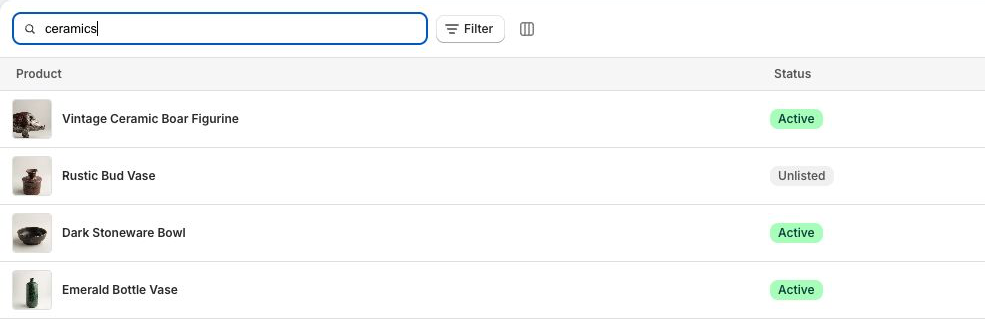
06 / Colin in ChatGPT
“Give me a stronger first row.” “Keep this collection focused on weekly winners.” “Make it a sale edit this weekend.” Work through the idea with Colin in the same conversation.
ChatGPT can work with Colin’s collection conditions, Advanced Sort, Campaigns, and Shareable Lists through MCP. The configured rules keep running in Colin.
Requires Colin Agent Access and a compatible ChatGPT plan/workspace. Available actions and plan limits still apply.
You: “For Japanese ceramics, keep the 20 strongest monthly revenue products that are in stock.”
Colin: “Use In stock = Yes with a top-20 limit ordered by Revenue (30d) for the Colin product block. Membership will refresh during sync.”
You: “Lead with four new arrivals, then eight products with the strongest weekly revenue, then everything else.”
Colin: “That fits a Segment: new arrivals first, weekly revenue leaders next, and a remaining-products group.” Requires Part-time or Full-time.
You: “On Saturday and Sunday, include our existing markdowns, move them first, and call this Japanese ceramics — Weekend sale from 09:00 to 23:00.”
Colin: “That is a recurring Schedule with condition, sorting, and title changes for that daily window.”
You: “This collection should lead with monthly gross-profit contributors.”
Colin: “Use Gross profit (30d), descending, as its Advanced Sort field. The result depends on synchronized sales and product costs.”
You: “Move our ceramics sale to 10:00–22:00.”
Colin: “Which ceramics Campaign do you mean?”
You: “The weekend one.”
Colin: “Keep its merchandising changes and update the Schedule window.”
You: “Make a Shareable List of in-stock products with at least 20 sales in the last 30 days.”
Colin: “Use In stock = Yes and Units sold (30d) ≥ 20. The list’s membership will be reconciled when Shareable Lists sync.”
You: “Sync Japanese ceramics now.”
Colin: “I can queue a managed collection sync to apply its enabled population and sorting.” The conversation reports queue or completion status from the actual response.
Choose Colin’s workload
Choose capacity for the collections you want Colin to maintain. All three public plans include Campaigns, Advanced Sort, Populate by Colin, and Catalog.
A managed collection has Advanced Sort or Populate by Colin enabled. A daily sync slot is a scheduled time for collection updates.
USD monthly pricing with a seven-day trial. Shopify determines final billing and trial eligibility.
Colin’s Shopify App Store listing is coming soon. Questions about early access? Email colin@ramiapps.com.
Before you hire Colin
Choose a collection and a commercial goal: feature recent profit contributors, build a weekly bestsellers selection, or plan a weekend sale. Start with the matching recipe above and adapt its thresholds to your store. The in-app Learn course walks through these tools.
No. Collections can combine Shopify product sets with a Colin product block. Colin updates the product block it owns; Campaign condition changes target the selected supported source.
Saved configuration and applied changes are different. Collection syncs apply enabled population and sorting strategies; Campaigns run at their configured times. Check sync and Campaign activity rather than assuming a save has changed Shopify.
No. Restoration applies to supported settings in bounded Campaigns. It is not a whole-collection rollback, and activation-only Campaigns have no end-time restoration phase.
No. Colin’s merchandising follows the rules, store data, and schedules you configure. ChatGPT and Claude are optional ways to communicate with Colin.
A collection where Advanced Sort or Populate by Colin is enabled. A snapshot collection created once from Catalog does not consume managed-collection capacity.

Your collection merchandiser
Tell us what you’d like Colin to take care of. Email colin@ramiapps.com about early access.
Ask about early accessRevisit the ceramics example